Page 1 of 1
Is anyone trying out Windows 7 ?
Posted: Tue Jan 13, 2009 9:09 pm
by LinuxMint-4
Is anyone trying out Windows 7 ? I tried to download using Firefox, It seemed I could not do it. So I opened up Internet Exploder and downloaded it the other day and burned the DVD. I have a test machine where I swap out hard drives to test distros. I found a 38 GB hard drive and installing Windows 7 on it right now.
http://www.microsoft.com/windows/window ... nload.aspx
Re: Is anyone trying out Windows 7 ?
Posted: Tue Jan 13, 2009 10:30 pm
by eddie
Just dl'ed it for comparison purposes. Maybe in a week or two I'll play with it.
Re: Is anyone trying out Windows 7 ?
Posted: Tue Jan 13, 2009 10:44 pm
by LinuxMint-4
Just a update, there are 5 keys that "can" work with Windows 7. There are 5 keys for 64 bit and 5 keys for 32 bit. You can find the keys at.
http://winse7en.blogspot.com/2009/01/fr ... t-key.html
So I guess the keys are no big secret, just remember that even with the keys ...Win 7 expires August 1 2009. Still you get a Windows operating system for free for almost 8 months.
I only mention the keys because the one that I got when I downloaded Windows 7 was not valid...even though they are among the 5 "public" keys. The keys that did not work started with 6JKV2.
Speaking of activation, while you are installing the OS it asks for the keys then once the OS is installed there is that nag where it asks you to activate online even though you might have checked the activate online while installing. Activating online was successful.
While installing it asks you for a password to use for logging in. When you log in, the log in screen looks exactly like Vista. Once you get things going, it will download some updates and there is a flag on the bottom right where it prompts you to click it and then a window opens up and requests to scan your computer for viruses, this is Windows Defender. Then it prompts you to install a anti virus program, and it even offers you to look online for anti virus programs.
The install took about 20 minutes on a five year old Power Spec machine with 2.09 Ghz speed and 1.25 GB RAM. There are gadgets that you can put on your desktop, the same ones used in Vista.
I put the CPU/RAM gadget and it is reading 49% and all I am doing is downloading AVG. So about 600 MB of 1.25 RAM is being used just for the desktop. It is still way too much RAM for nearly hardly any activity. I think I have measured Ubuntu 8.04 resting at desktop around 200 MB ram on the same machine.
I think some Vista type hacks might be in order here to improve RAM ....like disabling ...windows defender, system restore, indexing, and so on.
If you are wondering, yes there is a windows experience number just like in Vista. The number ranges from 1 to 7.9 . My computer average, is a 1 experience which is pretty poor...and this machine isn't ready yet for the trash heap....
The performance seems snappy and it is a improvement over Vista, but if you still have a XP machine for some specific Windows only applications...there is no compelling reason to upgrade. But if you had to upgrade, its better than Vista. Should you download this? Yes! A good free OS is hard to pass up...even though its only "free" until August 1 2009.
Re: Is anyone trying out Windows 7 ?
Posted: Tue Jan 13, 2009 10:48 pm
by greggh
I may try it out to the extent of "will it blend", but that's about it.

Re: Is anyone trying out Windows 7 ?
Posted: Wed Jan 14, 2009 12:46 pm
by jstgtpaid
Uggh... I won't be d/l'ing this rascal. I am sure the d/l stats will be used for marketing etc and I will not contribute to that.
Looking at the first post it strikes me as odd that windows includes 'windows defender'. If I was a 'winders' user why would I trust MS to provide that product?
Anyway... There were supposedly lots of goodies that were dropped from Vista prior to release. I wonder if those goodies will make it into 'winders' 7? I forget what those elements were, but I thought there was some new file system or something like that?
Re: Is anyone trying out Windows 7 ?
Posted: Thu Jan 15, 2009 8:26 am
by dpkgregor
This is actually the second Windows release I don't care about.
Re: Is anyone trying out Windows 7 ?
Posted: Fri Jan 16, 2009 5:23 am
by eddie
1. it does not recognize hardware out of the box except generic ones.
2. You have to be tethered to the net to get any benefit. I installed W7 without a network connection
3. it was slow and clunky even on a 1.7 socket 478 celeron with 1.25 g ram.
4. looking at the desktop, It was pretty much the same old tools, but just rearranged.
5. The first reboot it warns you of needing virus protection. That exudes confidence.
6. It would not seemingly install on anything but the primary drive. that's a bummer.
Need I go on? Linux is now on the machine.
Re: Is anyone trying out Windows 7 ?
Posted: Fri Jan 16, 2009 8:40 am
by MattKingUSA
What's a virus? I keep hearing these windows users talk about viruses.

Re: Is anyone trying out Windows 7 ?
Posted: Fri Jan 16, 2009 3:00 pm
by eddie
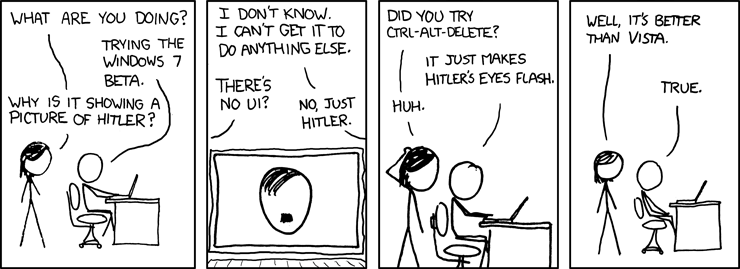
xkcd on W7
Re: Is anyone trying out Windows 7 ?
Posted: Fri Jan 16, 2009 6:16 pm
by trivthebofh
I downloaded the 64-bit version as I figured it would be a good way to test out VirtualBox 2.1.0 on my Ubuntu system.
I had an old Virtual Disk kicking around from messing around with Kubuntu, so I thought I'd install Win7 on there. NOT SO MUCH. My virtual Disk was 10GB and therefore too small to install Windows 7 onto (ouch).
So I made myself a 12 GB disk (that should be plenty, I mean how big can this thing be?). Everything installed fine, although booting is painfully slow (compared to XP under VirtualBox at least). What really blew me away is, after install and Windows updates, and installing no other software, Windows 7 took 9.47GB!!! I suppose I shouldn't be surprised by bloat in Microsoft products but this did catch me off-guard a little. Especially since I can install Ubuntu off a CDROM and start off with more software than what comes with Windows 7.
Re: Is anyone trying out Windows 7 ?
Posted: Sun Jan 18, 2009 9:59 am
by diazamet
So what do you get for in exchange for 10GB of disk space?
Re: Is anyone trying out Windows 7 ?
Posted: Mon Jan 19, 2009 10:33 am
by dann
diazamet wrote:So what do you get for in exchange for 10GB of disk space?
Sounds like he got about 9.5gb of wasted space and 2.5 gb free to install ubuntu via wubi on that image.
That's crazy, 9.5 gb for an OS, File Manager and Web Browser. Oh yeah, a text editor and some desktop widgets. It must be the .net framework in there.
Re: Is anyone trying out Windows 7 ?
Posted: Mon Jan 19, 2009 4:03 pm
by eddie
Tinycore linux can almost do that in about 10 megabytes. DSL and it's cousins can do more than 10 times that in under 100 megabytes on a p1 or less with under 100 meg. Even at that you can use them without any installation from a live mini cd.
Re: Is anyone trying out Windows 7 ?
Posted: Wed Jan 21, 2009 12:07 pm
by trivthebofh
dann wrote:diazamet wrote:So what do you get for in exchange for 10GB of disk space?
Sounds like he got about 9.5gb of wasted space and 2.5 gb free to install ubuntu via wubi on that image.
That's crazy, 9.5 gb for an OS, File Manager and Web Browser. Oh yeah, a text editor and some desktop widgets. It must be the .net framework in there.
That is exactly right. You can add a bunch of polish to a piece of shit but in the end all you've got is a shiny piece of shit.
Fortunately Wine is allowing me to play more of my games under Linux, which for now is the only reason I'm still dual booting my gaming rig with XP.
Re: Is anyone trying out Windows 7 ?
Posted: Thu Jan 22, 2009 4:26 am
by eddie
I have use wine also to load drivers for windows only equipment like some of the airlink101 equipment. I probably use dosemu more to run some of my old quickbasic programs.