HDTV and video cards with component out

Hey drop us a line about the show. Feel free to ask questions, provide feedback and criticism, or just ramble on about anything your little heart desires.

Moderators: snarkout, Patrick, dann

User avatar
Vogateer
Posts: 700
Joined: Thu Nov 17, 2005 11:18 pm
Location: Norman, Oklahoma
Contact:

HDTV and video cards with component out

Post by Vogateer » Wed Mar 14, 2007 3:41 pm

I registered with the MythTV forums, but it must require administrative approval, since it's taking a bit of time for me to get my confirmation.

In the meantime, I thought I'd post a little query here, since I know some people run MythTV. Has anyone managed under Linux to get a video card to use the little s-video–like connector to component out attachment that seems to come with some video cards? I imagine it's going to be a pain to attempt what I have planned, since I don't believe my TV has a standard resolution, and it doesn't have a DVI interface, either.

If nobody else has managed, I'm a bit concerned about being a guinea pig, but willing to give it a go, after checking out a few stores' return policies, of course. If I can get that to work, I plan to give my MythTV project a nice priority boost after our cheap VCR went out on us. Sure, I could buy another cheap VCR, but why not get started on a MythTV box since that's been in my plans for a while? :)
Vim is beautiful

User avatar
snarkout
Site Admin
Posts: 1342
Joined: Tue Aug 16, 2005 9:35 pm

Post by snarkout » Wed Mar 14, 2007 4:15 pm

I'm confused here. Are you asking if the svid out on your video card works? If so, the svid to rca converter cable definitely works, but I can't say if your card will actually ouput from the svideo jack. It should, but you'll have to look at your xorg.conf and figure out how to get it running. I imagine it will be similar to hooking an external moitor to a lappy, though.
Shared pain is lessened, shared joy is increased; thus do we refute entropy.
--Spider Robinson

hellonorman
Posts: 267
Joined: Wed Dec 28, 2005 11:08 pm

Re: HDTV and video cards with component out

Post by hellonorman » Wed Mar 14, 2007 4:44 pm

Vogateer wrote:I registered with the MythTV forums, but it must require administrative approval, since it's taking a bit of time for me to get my confirmation.

In the meantime, I thought I'd post a little query here, since I know some people run MythTV. Has anyone managed under Linux to get a video card to use the little s-video–like connector to component out attachment that seems to come with some video cards? I imagine it's going to be a pain to attempt what I have planned, since I don't believe my TV has a standard resolution, and it doesn't have a DVI interface, either.

If nobody else has managed, I'm a bit concerned about being a guinea pig, but willing to give it a go, after checking out a few stores' return policies, of course. If I can get that to work, I plan to give my MythTV project a nice priority boost after our cheap VCR went out on us. Sure, I could buy another cheap VCR, but why not get started on a MythTV box since that's been in my plans for a while? :)
If your tv has hdmi I would suggest a dvi-hdmi cable and hope that your tv outputs ddc(or dcc or dcd) or whatever that's called.

Otherwise you will have to find the proper modelines for your tv and edit xorg.conf.
"It's not a lie, if you really believe it"
--George Costanza

User avatar
Vogateer
Posts: 700
Joined: Thu Nov 17, 2005 11:18 pm
Location: Norman, Oklahoma
Contact:

Post by Vogateer » Wed Mar 14, 2007 4:47 pm

Sorry, I never can ask a question clearly...

I'm looking to build a MythTV box, and want to use component video, since that's the best quality input my TV has. There seem to be video cards that offer component out, but I've read that they don't always work. The thing is, when I read about them not working, they seem to be posts that are almost two years old, so I'm not sure if the situation has improved.

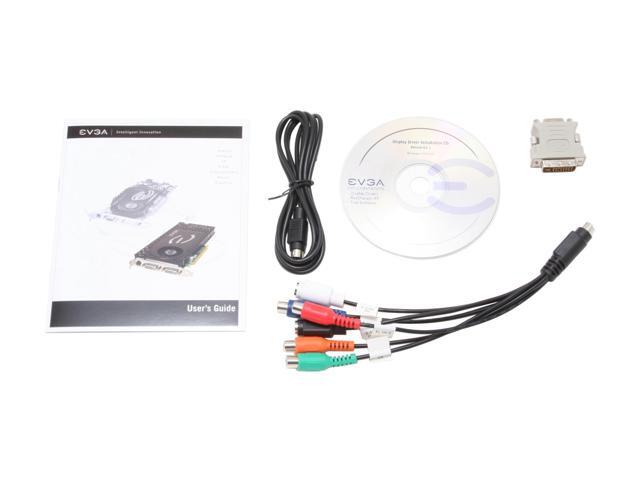
The connection just happens to look like S-video, while splitting up to component. I think S-video works, too, but there are extra connections specifically to handle component. A picture is probably more helpful here. Let's see if I can link to a pic:
Image

That particular HDTV connector has a few more connections than most, but you can see how one end bears great resemblance to an S-video out, while splitting into the component video. This is one of the few complaints I have about NewEgg, they label it "composite" out when it's "component" out. Highly annoying, because you never know which one you're getting unless they have a pic like the one above.

Anyhow, I just vaguely remember reading some posts where people had trouble getting it working, or that it wasn't supported, but it was a while ago.

I did find one post that suggested someone had it working. I forgot about the AVS Forum. Here's a link to the discussion, looks like someone had about as much luck searching as I did. I would have liked to have seen the xorg.conf file, as the first poster asked for.
Vim is beautiful

User avatar
Patrick
Site Admin
Posts: 2519
Joined: Tue Apr 27, 2004 11:38 am
Location: Easton, PA
Contact:

Post by Patrick » Wed Mar 14, 2007 4:57 pm

I just purchased some new hardware for my MythTV v2.0 box:
http://pdavila.homelinux.org:8080/blog/?p=205
Ego contemno licentia

User avatar
Vogateer
Posts: 700
Joined: Thu Nov 17, 2005 11:18 pm
Location: Norman, Oklahoma
Contact:

Post by Vogateer » Wed Mar 14, 2007 5:09 pm

Great Scot! That's fantastic, Pat!

Now my only concern is that my funky TV probably has some bizarre resolution. I'll have to call the company tonight. The TV looks fine, and I can't really tell a difference between it and HDTV (my eyesight is horrible, though). I mainly wanted the huge difference in quality that came with taking the HDTV signal over the air, compared to the awful quality we were getting with the standard definition over the air signal. I didn't care if it was "enhanced definition" instead of true HD at the time, but I'm paying for that now, though. :oops:

Gracias, Pat.
Vim is beautiful

User avatar
Patrick
Site Admin
Posts: 2519
Joined: Tue Apr 27, 2004 11:38 am
Location: Easton, PA
Contact:

Post by Patrick » Wed Mar 14, 2007 5:26 pm

Vogateer wrote:I'll have to call the company tonight. The TV looks fine, and I can't really tell a difference between it and HDTV (my eyesight is horrible, though). I mainly wanted the huge difference in quality that came with taking the HDTV signal over the air, compared to the awful quality we were getting with the standard definition over the air signal.
Are you serious? HDTV looks way better than SD. HD comes in various flavors with the highest being 1080i (for cable, OTA, satellite) and 1080p for blu-ray DVD. My tv will show standard def with the bars on the sides. Some channels only broadcast in 720p. It looks better than SD but not as nice as 1080. ESPNHD, DiscoveryHD, HDNet, HDDiscovery are 100% 1080i. Some channels such as PBSHD will revert back to SD(480i) for whatever reason. The HD versions of shows like Heroes look amazing. Just my .02
Ego contemno licentia

hellonorman
Posts: 267
Joined: Wed Dec 28, 2005 11:08 pm

Post by hellonorman » Wed Mar 14, 2007 6:34 pm

Vogateer,

There's a couple of questions that come to mind immediately. First what model tv do you have?

Second. Does your video card actually output a better signal over those component cables or is it simply providing you a way to connect to a tv that may not have an svideo port?

It would seem that the svideo port would be the limiting factor there as that sure looks like an s video port in the picture. So I guess I'm wondering if it's just outputting s video quality over the component cables or if it actually can send a better signal.
"It's not a lie, if you really believe it"
--George Costanza

User avatar
snarkout
Site Admin
Posts: 1342
Joined: Tue Aug 16, 2005 9:35 pm

Post by snarkout » Wed Mar 14, 2007 7:53 pm

Ah - I thought you meant something like this:

http://us.st11.yimg.com/us.st.yimg.com/ ... 37_2754027

But with a cable between the rca part and the svid part.
Shared pain is lessened, shared joy is increased; thus do we refute entropy.
--Spider Robinson

User avatar
Vogateer
Posts: 700
Joined: Thu Nov 17, 2005 11:18 pm
Location: Norman, Oklahoma
Contact:

Post by Vogateer » Wed Mar 14, 2007 11:36 pm

hellonorman wrote:Vogateer,
There's a couple of questions that come to mind immediately. First what model tv do you have?
My model TV is a weak Insignia (Best Buy's rebranded Magnolia) IS-TV040927. I've called the manufacturer, the local Best Buy store, and the 1-888 number, and nobody seems to know anything about this TV. It's certainly not HD, more like a mildly enhanced def TV, but it was cheap (Both my previous TV and I were broke at the same time). It gave me HDTV signals from an antenna though, which was really what I wanted, and a tremendous improvement over what we were getting before.
hellonorman wrote: Second. Does your video card actually output a better signal over those component cables or is it simply providing you a way to connect to a tv that may not have an svideo port?

It would seem that the svideo port would be the limiting factor there as that sure looks like an s video port in the picture. So I guess I'm wondering if it's just outputting s video quality over the component cables or if it actually can send a better signal.
I haven't actually bought a video card yet, this is sort of "research" before I start purchasing. The reason I first posted was that I distinctly remember someone saying in a forum that the component out of some nVidia card wasn't supported under linux, but it was some time ago, and apparently the support has improved. I'm thinking of taking the route Pat did, since he's already had success, and having component out from the motherboard could save me some cash. Don't worry Pat, I won't blame you if things go awry. :wink:

But yeah, it looks like you're thinking the same thing I did when I first saw something like this, but if you look closely at the picture of the card, you'll see several extra pins on the S-Video–like port. It's sometimes called a TV-Out port or a VIVO port as well. I remember reading somewhere that these extra pins enable the port to produce both S-Video and Component-Out, with the Component being truely Component quality, include HDTV quality signals. Pic below:

Image

Good questions, hellonorman, sounds like you were looking out for me, which I appreciate.

Snarkout: Man, that connection would be cheap; I do try to preserve some quality of the signal even though I'm about blind… :lol: But yeah, I can see why you were confused by my question. My question was so broad and general, I should be damned glad anyone tried to answer at all. I'm glad I did post, though, since Pat gave me a great recommendation, even though I neglected his blog post, and even remember him talking about it on one of the tech shows. Were my mind not like a sieve, I would have remembered that and visited his web log.

Pat: Oh yes, HDTV looks far better than SD. But when I was broke, an "enhanced def" screen that picked up a digital HDTV signal over-the-air seemed the best option for the money. I'm sure you can tell the difference if you look closely, but "enhanced def" and HD aren't so obviously different on a relatively small screen from over 10 feet away, but the cost was certainly different back in 2005. I'm sure we'll get a good TV within a year or so, but in the meantime I don't want to spend money on another VCR (the other one busted) when I was planning to build a MythTV box very soon anyway.

My TV only has a 26 inch screen, and I think there's only so much resolution I can discern when the screen size is below 32 inches. If the screen starts to approach 40 inches, then the difference is not only noticable, but impressive. This is just my opinion, but you know, if I remember correctly I have about 20/400 vision. Yes, two zeroes on the second number. My contacts were -7.50 when I used to wear them. If it weren't for the resolution causing trouble now, I would still think it the best deal for the money considering I have such bad eyesight.

Vim is beautiful

User avatar
Vogateer
Posts: 700
Joined: Thu Nov 17, 2005 11:18 pm
Location: Norman, Oklahoma
Contact:

Post by Vogateer » Wed Mar 14, 2007 11:48 pm

Oh yeah, and reading this from the Cost Analysis of Windows Vista Content Protection rings true:
The silly thing about the industry's obsession with image quality is that repeated studies have shown that what really matters to viewers (rather than what they think matters) is image size and not quality. Sure, if you take the average consumer into a store and put them in front of the latest plasma panel they'll be impressed by the fact that they can count each individual hair in Gandalf's beard, but once he's leaping about wrestling with the balrog this detail becomes lost and the only differentiator is image size. You can find a good discussion of this in The Media Equation by Stanford professors Byron Reeves and Clifford Nass. In one experiment on visual fidelity they showed a film using the best equipment they could get their hands on, and again using a fifth-generation copy on bad tape and poor equipment. There were no differences in users' responses to the two types of images (see the book for more details on this). You can see an example of this effect yourself if you can set up a machine with a CRT and an LCD monitor. Use the CRT monitor for awhile, then switch to the LCD monitor for a minute or two. When you go back to the CRT monitor, does it seem faulty? Did you notice this before you looked over at the LCD monitor?

Conversely, image size is a huge differentiator: The bigger the better. So in practice a degraded image on a huge VGA monitor (or by extension anything with a lower-quality analog input) will rate better than a non-degraded image on a much smaller LCD monitor, assuming you can find an example of the latter that Vista will actually output an HD image to. Of course convincing consumers of this is another matter.
Same thing for me. I really don't notice the difference in picture quality from the resolution. What I DO notice, and notice greatly, is that the digital over-the-air signal gives much greater clarity and sound, but when the standard over-the-air signal we were getting was snowy and prone to static, such a difference really is incredible. We went from snow and picking up truckers' ham radios every once in a while to crystal clear digital clarity over the course of a couple of days. We noticed.
Vim is beautiful

hellonorman
Posts: 267
Joined: Wed Dec 28, 2005 11:08 pm

Post by hellonorman » Thu Mar 15, 2007 2:32 am

Ok so it does look like it supports the better signal. The problem you will face is finding the correct modelines for your xorg.conf file. I did a quick google search for that tv and yikes I didn't find anyone that had good things to say about it. It doesn't really list the resolution that the tv supports which isn't a real good sign either.

------------------------


While I agree with that analysis to a certain extent there is no mistaking true hd source material. There is a huge difference in the source material being broadcast even on so called hd channels. For instance I can watch my local fox hd channel and even though it's hd many shows don't look that much better than standard def because the source material isn't much better than standard def.

But the other night I watched American Idol( yeah I know don't laugh) and it was STUNNING how good it looked. There is no mistaking the quality difference no matter what size display. The show was obviously being broadcast at higher quality than other shows even on the same hd channel so I think that makes a huge difference also. I almost can't watch lesser quality after seeing that for the first time. I suggest that you go to these stores while something like idol or lost is on and to really get an idea of what hd is supposed to be. There will be no mistaking it even for a near blind man like you :-)

I have a 42" panasonic plasma but I could see the same stunning difference on my 20" computer lcd.
"It's not a lie, if you really believe it"
--George Costanza

User avatar
Vogateer
Posts: 700
Joined: Thu Nov 17, 2005 11:18 pm
Location: Norman, Oklahoma
Contact:

Post by Vogateer » Thu Mar 15, 2007 7:02 am

Man, I do remember the first time I watched Tonight with Jay Leno with an HDTV signal, and I was amazed. I knew the TV wasn't going to win any prizes, but man, did it look beautiful to me.

Now, when I go to someone's house where they have true HD, and I see some really great ESPN coverage or something else with a well done HD signal, I agree, even a blind man like myself can tell the difference. Some of the nature stuff on PBS (Pretty Bitchin' Shit) really does have stunning quality as well. I can usually spot the Standard stuff transmitted over HD, as long as I'm paying attention. I do notice that DVDs don't have the clarity of HD, as well. But related to the point Peter Guttman was making, I really do have to be paying attention to notice, and I usually don't notice for more than 5–10 minutes.

Of course, you can figure out where my priorities are by looking at the system. Most of my audio stuff costs more than my TV, including the B&W speakers, Rotel amplifier, Sony (bought before my boycot many years ago) SACD player, and even the Music Hall turntable. With music I really want good equipment. The TV? Well, when we buy a good one I imagine it will impress others more than it impresses me. Movies and TV just don't have the same impact on me that music does.

Here's one reason why we want to get a MythTV box. The way we record right now is to have the TV on and have the outputs from the TV feed the VCR. This way you get to record the digital signal, even if it's obviously not HD, and we actually get something usable to watch. If we had to record standard TV, well, we wouldn't even bother. If we want to program a show to record while we're gone, which is pretty often, we have to program the TV to come on to the right channel, and program the VCR, too. There's also no changing the channel on the TV, you can only program one channel at a time to come on. That's just a hassle.

Okay, it looks like someone on the AV Forums with the exact same TV just used 1080i and put the resolution at 1920 by 1080, and did okay. I figured that with a funky resolution that they must have some sort of converter in there, because you know you're not going to find DVDs or any other source giving it a signal that's at its actual resolution. That gives me hope.
Last edited by Vogateer on Thu Mar 15, 2007 8:01 am, edited 1 time in total.
Vim is beautiful

User avatar
Patrick
Site Admin
Posts: 2519
Joined: Tue Apr 27, 2004 11:38 am
Location: Easton, PA
Contact:

Post by Patrick » Thu Mar 15, 2007 7:22 am

You can tell when certain shows are just upscaled SD. TNTHD tends to do this quite often along with the network HD channels during the day. On my cable system the extra $8 a month for the HD tier is well worth it. HDDiscovery, ESPNHD, National Geographic HD, HDNET, PBSHD. Some of those "boring" nature documentaries looking absolutely amazing. HDNET is a great channel. Enterprise in HD looks great. I also like that fact that HDNET shows a lot of sports and concerts in HD.

A simple test is to tune to an HD broadcast of say Heroes or Jay Leno then flip to the SD channel of the same show. Go back and forth. The difference is very stark on my 51 inch set.
Ego contemno licentia

User avatar
Vogateer
Posts: 700
Joined: Thu Nov 17, 2005 11:18 pm
Location: Norman, Oklahoma
Contact:

Post by Vogateer » Thu Mar 15, 2007 7:51 am

Yeah, the difference between SD and HD is huge, even on my bad TV. Kind of like the difference between VHS and even bad DVD. Sure the color isn't perfect and such, but in my experience, even bad DVD is vastly superior to VHS.

The funny thing I didn't know about was sub-channels on HDTV. Not that I'll probably be watching 4 channels of PBS, or watch the weather sub-channel a lot of stations play constantly, but that was a nice little surprise when I got home—"What's that -001 next to the channel?" Just with the antenna I'm getting channels I didn't know we had, and multiple sub-channels of them at that.
Vim is beautiful

Post Reply